Ever come home to find a package missing, and no idea who took it? That’s usually the moment people start googling “smart doorbell camera” at 11 pm, half annoyed and half panicked. I’ve been there myself, after a courier left a parcel outside my gate in Jaipur and it vanished within twenty minutes.
A good doorbell camera fixes that blind spot. But walk into the market — or scroll through Amazon — and you’ll find fifty options that all claim to be “smart,” “AI-powered,” and “essential.” Most of that is marketing noise. This smart doorbell camera guide cuts through it and tells you what genuinely matters before you spend your money, and what you can safely ignore.
By the end, you’ll know exactly which features are worth paying extra for in 2026, and which ones are just there to pad the spec sheet.
Why a Smart Doorbell Camera Is Worth Considering
Smart doorbell camera setups aren’t just for paranoid homeowners anymore. They’ve become fairly standard, especially in apartment complexes and independent houses with a bit of street-facing frontage.
Here’s the direct answer: A smart doorbell camera lets you see, hear, and speak to whoever’s at your door from anywhere, using your phone. It records video, sends motion alerts, and often deters theft simply by being visible.
Think about the practical uses beyond just catching thieves:
- Confirming a delivery actually happened (huge for online shopping disputes)
- Screening visitors before you open the door, especially useful for elderly parents living alone
- Keeping an eye on kids coming home from school
- Basic security theatre — a visible camera alone puts off a chunk of casual troublemakers
None of this requires a full CCTV setup with a DVR box in your storeroom. That’s really the appeal.
Key Features to Check Before You Buy
This is where most buying guides get lazy and just list every possible spec. I’m not going to do that. Some features matter a lot, others barely move the needle.
Video resolution is one that actually matters. Go for at least 1080p. Anything lower and you’ll struggle to make out a face or a number plate at night, which somewhat defeats the whole point.
Field of view matters more than people realize. A narrow 90-degree lens misses anyone standing slightly off to the side. Look for something in the 150–180 degree range if you can.
A few other things worth checking on the spec sheet:
- Night vision quality (infrared is fine, color night vision is better but pricier)
- Two-way audio with decent mic quality — tinny audio makes conversations awkward
- Weatherproofing rating (IP65 or higher, since Indian summers and monsoons are both brutal on electronics)
- Local storage option, not just cloud (more on this below)
I’ll be honest — I think a lot of buyers overweight resolution and underweight field of view. A crisp 2K video that only shows the middle three feet of your porch isn’t that useful.
Battery Life vs Wired Installation
This is one of the first real decisions you’ll make, and it shapes everything else about the purchase.
Wired doorbells connect to your existing doorbell transformer or a plug point near the door. Battery ones run on rechargeable packs that typically last one to six months depending on usage.
Picture a small business owner in Jaipur running a boutique from a converted ground-floor space — foot traffic all day means dozens of motion triggers, which drains a battery model fast. For that kind of use, wired is honestly the smarter pick, even if the installation is a bit more work upfront.
For a typical home with moderate traffic, battery models are genuinely convenient. No electrician needed, no worrying about existing wiring compatibility with older homes (a real issue in a lot of older Indian housing stock). You just charge it every couple of months and mount it back.
The trade-off? You’ll get a low-battery notification eventually, and if you ignore it for too long, your camera goes dark right when you needed it most. Not fun to discover after a break-in.
Storage Options: Cloud, Local, or Both
Direct answer: Cloud storage keeps recorded footage on the manufacturer’s servers, usually behind a monthly subscription. Local storage (microSD or a hub) keeps footage on-device, free of recurring costs, but at risk if the camera itself is stolen or damaged.
Cloud storage subscriptions in India generally run somewhere between ₹99 and ₹399 a month, depending on the brand and how many days of footage you want retained. Some brands offer a free tier — usually just a rolling 24-hour clip history, which honestly isn’t enough if you’re traveling for a weekend.
Local storage sounds appealing because it’s a one-time cost. But here’s the catch: if someone actually breaks in and takes the camera itself, your footage goes with it. That’s the whole point of a subscription — the data lives somewhere they can’t reach.
My personal take? A hybrid approach is best if your budget allows it. Local storage as a backup, cloud for the important stuff. Not every brand supports this, so check before buying.
Smart Alerts and AI Detection
Not all “smart” alerts are equal, and this is where a lot of frustration happens after purchase. Has this ever happened to you — a camera that buzzes your phone every time a leaf blows past?
Basic motion detection triggers on literally anything moving in frame — a car, a stray dog, tree branches swaying in the wind. That gets old fast, and most people end up muting notifications entirely within a week, which defeats the purpose.
Better systems use AI-based detection to distinguish between:
- People
- Vehicles
- Packages
- Animals
This matters because you only want alerts for the categories you actually care about. A camera that can tell the difference between your neighbor’s cat and an actual person at your door saves you from notification fatigue.
Some premium models even offer facial recognition to flag “familiar” versus “unknown” visitors — handy, though it does raise privacy questions worth thinking about if you have domestic help or frequent visitors who wouldn’t want to be logged in a database somewhere.
App Experience and Ecosystem Compatibility
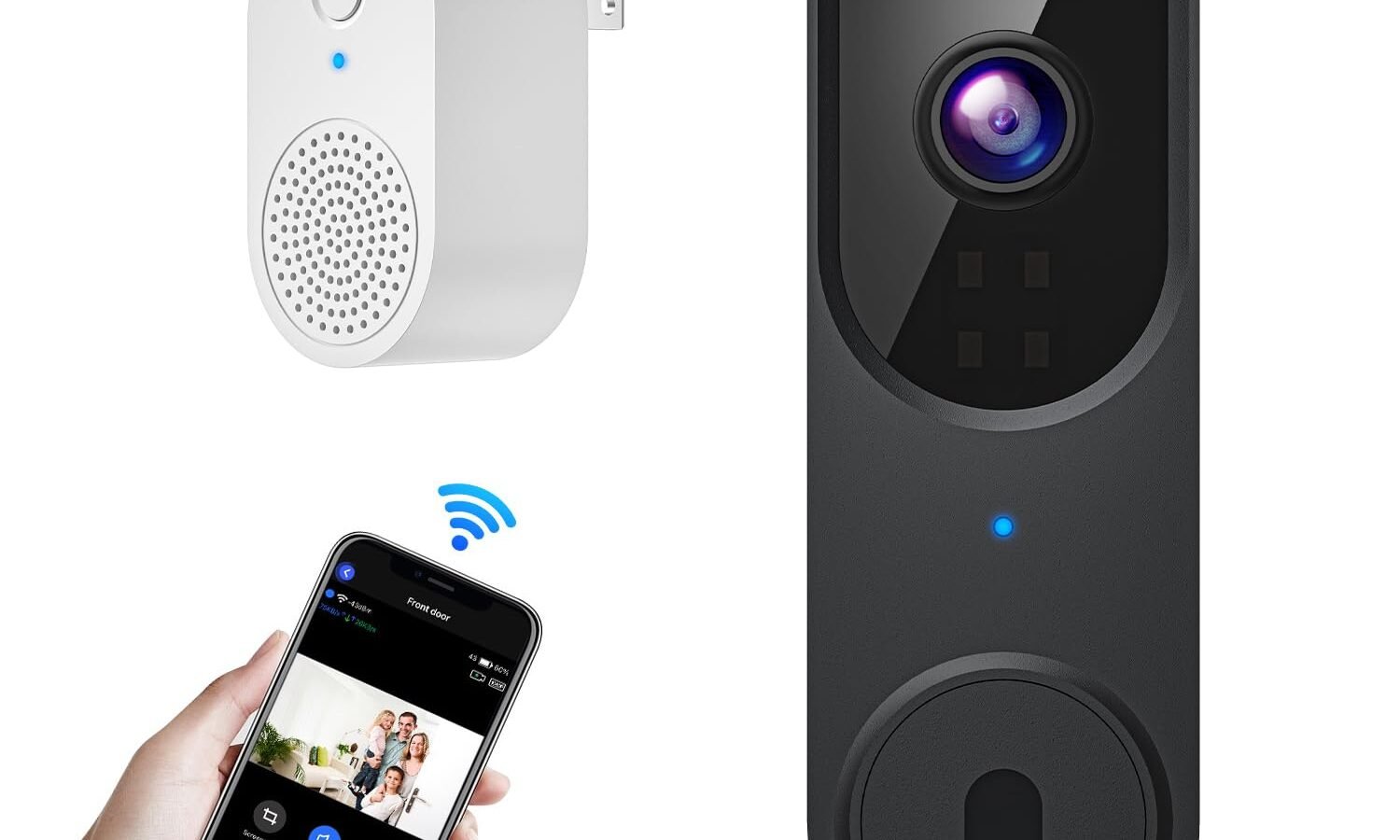
An underrated part of any smart doorbell camera guide: the app matters just as much as the hardware. A camera with great specs and a clunky, laggy app is genuinely frustrating to use daily.
Things worth testing before you commit (ask the shop for a demo, or check reviews specifically mentioning the app):
- How fast the live view loads — anything over 5-6 seconds feels broken
- Whether video playback is smooth or stutters
- If it integrates with Alexa or Google Home (useful if you already have smart speakers)
- Multi-user access, so more than one family member can check the feed
[link to related guide about setting up a smart home hub here]
I’ve noticed that budget brands often nail the hardware but skimp badly on app polish — bugs, slow updates, or apps that just stop getting maintained after a year or two. Check the app’s rating and recent reviews separately from the product reviews themselves.
Installation and Setup Considerations
Setup difficulty varies a lot more than brands let on in their marketing photos.
Wired installations, particularly retrofitting an existing doorbell wire, sometimes hit voltage mismatches — older Indian homes might have wiring that doesn’t play nice with a new smart doorbell’s power requirements. A quick call to an electrician before buying can save you a return-and-refund hassle later.
Battery and wireless models are simpler:
- Mount the bracket with the included screws (or double-sided tape for rental properties)
- Connect to your home Wi-Fi through the app
- Adjust the angle so it captures the walkway, not just the sky or the wall opposite
Rental tenants specifically should look for adhesive-mount options since drilling into a landlord’s door frame isn’t always welcome. A few brands now sell no-drill kits specifically for this.
Price Ranges and What You Get at Each Tier
Here’s a rough breakdown of what’s available in the Indian market as of 2026, so you know where your budget lands you.
- Under ₹3,000: Basic motion alerts, 720p-1080p video, limited app features, often no local storage
- ₹3,000–₹8,000: Better resolution, wider field of view, some AI detection, decent app polish
- ₹8,000–₹15,000: Full HD or 2K video, color night vision, advanced AI person/package detection
- Above ₹15,000: Premium brands, facial recognition, hub integration, longer warranty support
I wouldn’t recommend going below ₹3,000 unless it’s purely for a low-stakes area like a farmhouse gate you rarely use. The cheapest models tend to have the worst night vision and the flakiest apps, which is exactly when you need reliability most.
[link to related guide comparing top doorbell camera brands in India here]
Privacy and Data Security Considerations
This part gets skipped in most buying guides, and it shouldn’t be.
A smart doorbell camera is essentially a always-on internet-connected device pointed at a public-facing area. That raises a few real questions worth thinking through before installation.
Check where footage is actually stored — some cheaper brands route data through servers outside India, which matters if you’re privacy-conscious. Also worth checking: does the manufacturer have a history of data breaches? A quick search before buying takes five minutes and can save a headache later.
[link to related guide on home security and privacy basics here]
Also consider your neighbors. A doorbell camera with too wide a field of view might end up recording their front door too, which can get awkward. Angle it thoughtfully.
Frequently Asked Questions
Do smart doorbell cameras work during power cuts? Battery-powered models keep working fine during a power cut since they’re not dependent on your home’s electricity. Wired models depend on your setup — some draw from the doorbell transformer circuit, which may or may not be affected. Worth confirming with the seller.
How much internet bandwidth does a doorbell camera use? Not a lot for everyday use, but live streaming and recording can add up over a month, especially with a high-traffic entrance. Budget roughly 1-3 GB monthly for moderate use, more if you’re reviewing footage often.
Can I use a smart doorbell camera without Wi-Fi? Most rely on Wi-Fi for remote alerts and app access. A few high-end models support a cellular backup, but that’s rare and usually an added cost.
Is a smart doorbell camera legal to install in India? Generally yes, for your own property. Just be mindful of angling it away from directly recording inside a neighbor’s private space, which can create disputes even if no law is explicitly broken.
How long does footage stay in cloud storage? Depends entirely on your plan — free tiers often give just 24 hours, while paid plans range from 7 to 30 days of rolling storage. Check this carefully since it varies a lot brand to brand.
Do smart doorbells work well in extreme heat? Most decent models are rated for temperatures well above typical Indian summer highs, but battery performance can dip a bit in extreme heat, similar to how a phone battery behaves. Look for an IP65 rating or higher for peace of mind.
Final Thoughts
Picking the right smart doorbell camera really comes down to matching the features to how you actually live — not chasing every spec on the box. If you get frequent deliveries, prioritize AI package detection. If your area has patchy power, lean battery-powered. Renters should stick to no-drill mounts.
Don’t get talked into the most expensive model on the shelf assuming it’s automatically the best fit. Start with resolution, field of view, and storage, then build up from there based on your specific entrance and neighborhood.
If you’re setting one up soon, take ten minutes to actually test the app on your phone before installation day — it’ll save you a return trip to the store.